
EXAMPLE BREAKDOWN · CREATION TEMPLATE
AI Christmas Makeup Filter
Upload one selfie and explore Red & Gold Glam, Candy Cane, Snowflake and Christmas Tree Makeup.
Create a festive makeup video for holiday posts, TikTok and Reels.
Photo to video · Flexible length · 480p
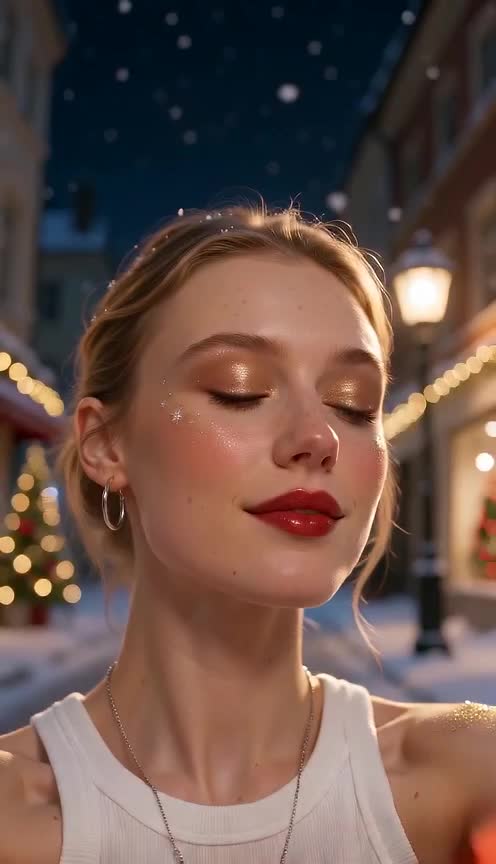

Upload your portrait and adjust settings in the generator before generating.
How it works
Use one clear, front-facing adult selfie without heavy existing makeup. Holiday selfies, Christmas party looks, festive Reels and TikTok, makeup inspiration before a party.
- Upload one clear, front-facing adult selfie, face visible, without heavy existing makeup.
- Pick one of four looks: Red & Gold Glam, Candy Cane, Snowflake or Christmas Tree Makeup.
- Adjust video settings in the generator, follow progress, download and share when ready.
Recreate the composition and action
- Red & Gold Glam: red lips, gold shimmer eyeshadow and gold glitter on the cheekbones, warm bokeh lights.
- Candy Cane: red-and-white striped liner and cheek stripes painted on skin, playful wink.
- Snowflake: icy blue-white eyeshadow with small painted snowflakes at the temples, gentle snowfall.
- Christmas Tree: green eyeshadow shaped like a tree with tiny painted ornament dots and a gold star accent.
Choose your video duration in the generator. Cosmetic makeup painted on the skin only; no masks, stickers or prosthetics.
The template prompt
This prompt is already included in the template. Refine its subjects, outfits and setting in the generator.
Animate the uploaded adult selfie into a continuous 5-second vertical video. 0–1.5s: the person with their natural bare face. 1.5–4s: makeup is visibly applied on the skin: glossy red lips, gold shimmer eyeshadow, fine gold glitter on the cheekbones. Real cosmetic makeup painted directly on bare skin, natural pores and skin texture visible, no mask, no sticker, no prosthetic. 4–5s: slow head turn to catch the light, warm Christmas bokeh behind. Static close-up. Vertical 9:16 frame, face in the upper-middle of the frame, keep the bottom quarter and right edge clear of the face and key action. The first 1–2 seconds show the original person unchanged; the transformation happens visibly on screen, and the final frame still clearly shows the same recognizable face. Preserve identity, facial proportions and hairstyle. No text, no logo, no watermark, no gore.
Frequently asked questions
Can I create a Christmas makeup video from a selfie?
Yes, one selfie, pick a look, choose duration in the generator.
Is the makeup painted on or a mask?
The template asks for makeup painted on the skin, keeping natural skin texture.
Is the AI Christmas makeup filter free online?
Eligible new accounts may receive signup credits when the offer is enabled; check the signup dialog and your balance.
Can I post my Christmas look on TikTok?
You can download your video and share it on TikTok, Reels or Shorts, subject to applicable law, the underlying model provider’s terms and the platform’s rules. Use photos you own or have permission to use.
What happens to my uploaded photo?
Uploaded reference photos are stored in Cloudflare R2 and sent to the AI model provider to generate your video. To request deletion of your data, contact support@aishorts.studio from your account email.